Sotech Studio
Turn institutional knowledge into narrated, visual and interactive experiences: generate voiced, subtitled training content with quizzes from a document or a short brief, edit it scene by scene, and publish as MP4, SCORM, embed code or a share link.
About the Product
Sotech Studio is a content studio that turns an organization's documents — PDF, Word, PowerPoint or plain text — into narrated, visual and interactive training content. You upload a document or describe the topic in a short brief, then choose a target length (3, 6, 12, 24 or 30 minutes), language, narrator voice and visual style. AI splits the content into scenes following the narrative template the organization defines, writes each scene's narration, on-screen key points, icons and visuals, and then produces the voiceover, word-timed subtitles and animations.
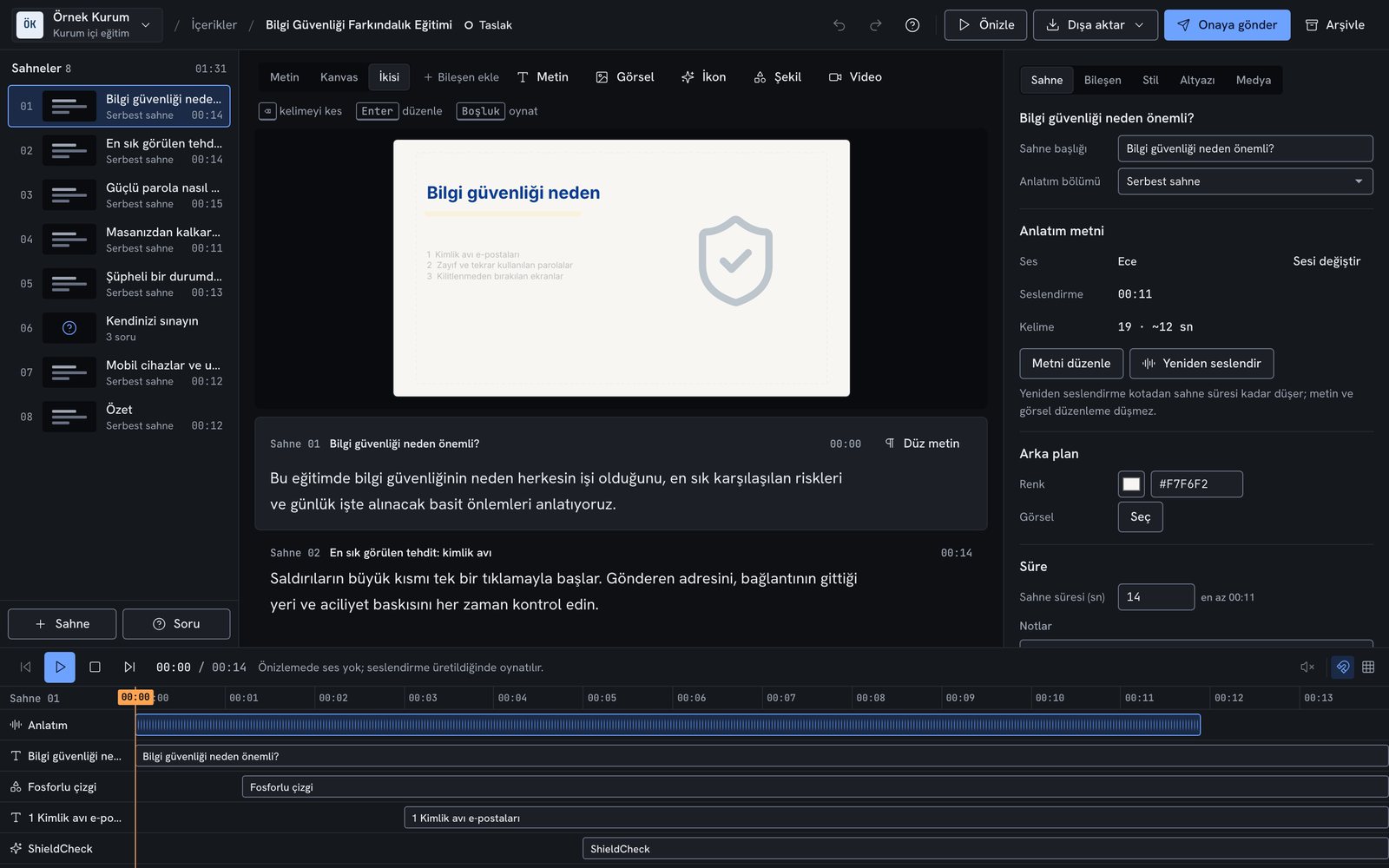
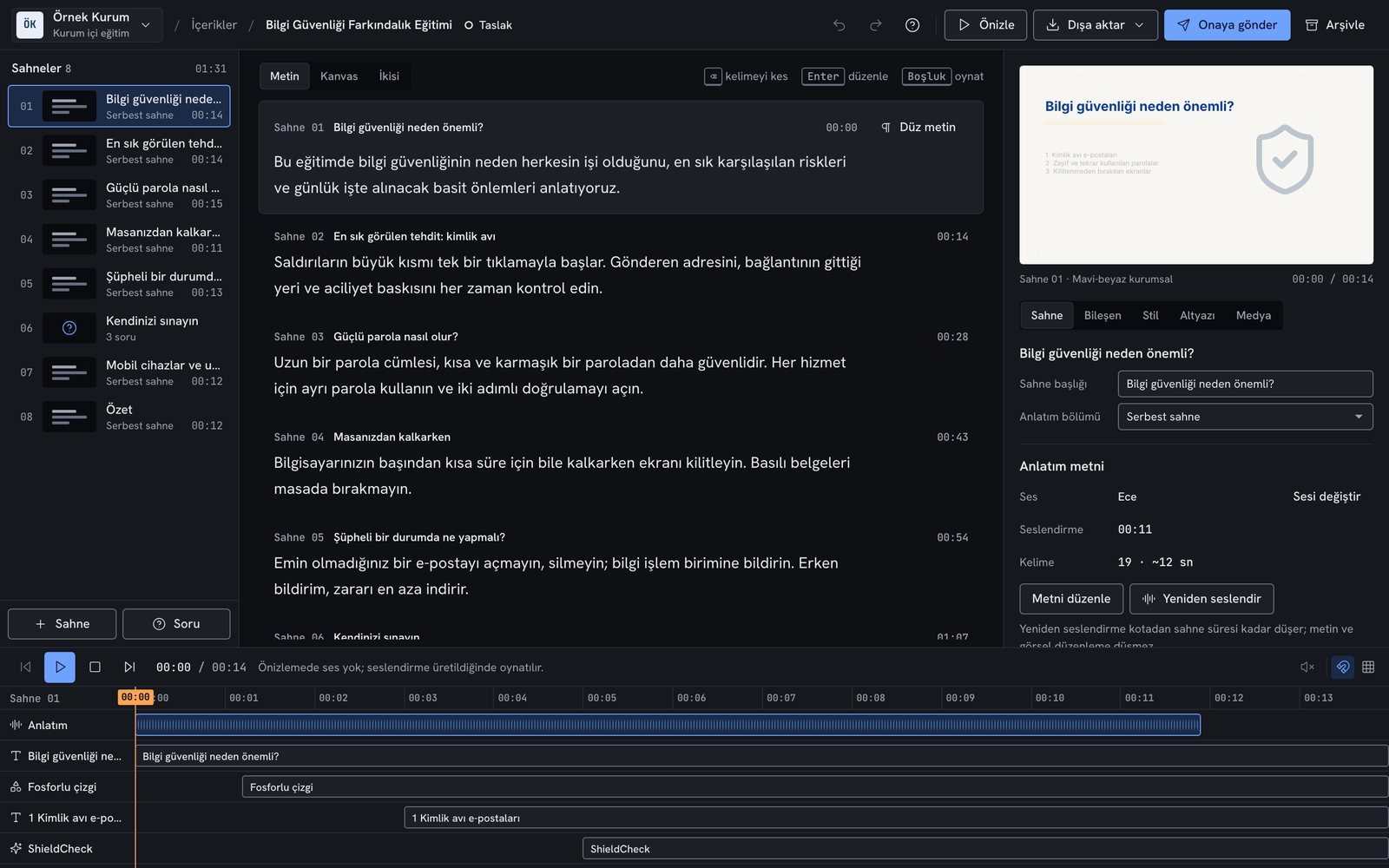
The generated content is a draft — the final word belongs to the organization. In the studio editor, scenes are edited on a canvas: text, image, icon, shape and video elements are added, and their entry and exit times are set on a timeline. When the narration text changes, only that scene is re-voiced; switching voices, regenerating a visual or dropping in the organization's own images and videos all happen without leaving the editor. Interactive scenes with single-choice, multiple-choice, true/false, ordering and drag-and-drop questions can be inserted anywhere in the content.
Preparer, approver and publisher roles are separate; approved content is turned with one click into an MP4 video, a SCORM 1.2 or SCORM 2004 package, an HTML embed code or a share link. The same player looks identical on the web, in learning management systems and on video. Organizations can also present their content on a publishing portal that opens with their own theme. Studio is integrated with Sotech Learn, Sotech's learning management system: published content is used as course content in Learn, and scores and progress are recorded on the learner's record. Personal data is masked before any text is sent to AI services, every action is written to a tamper-proof audit log, and the usage quota is charged only for successfully generated narration time.
Key Features
The uploaded document is parsed into text and heading structure, or the topic is described in a short brief. AI sets the number of scenes from the target length and drafts each scene's narration, on-screen key points, icon suggestions and visual description.
PDF · DOCX · PPTX · TXT · briefContent is planned for a 3, 6, 12, 24 or 30-minute target length. Narration can be produced in Turkish, English, German, French and Spanish, and content can be translated between them.
3 · 6 · 12 · 24 · 30 min · 5 languagesFor each content type, the admin panel defines which sections the narration consists of, in what order and with what share of the length. AI generates scenes following that order, so every piece follows the organization's standard structure.
your topic orderA voice library of female and male voices brings several voiceover providers together in one catalog. Every word's timing is captured, and both subtitles (TR/EN) and the synchronized appearance of on-screen elements are built from it.
multi-provider · word timingFour ready-made styles: whiteboard with handwriting and colored markers, eco-friendly green, blue-white corporate and colorful doodle tutorial. Each style combines a palette, typefaces, an icon set, a scene layout and an animation preference; the whiteboard style uses draw-on animation and does not depend on image generation.
whiteboard · green · corporate · doodleA color palette is extracted from the organization's logo and a few sample images; contrast is corrected automatically for legibility, and typefaces and layout are chosen. The previewed style is saved and can be used for all future content.
logo + samples → paletteScenes are edited on a canvas: text, image, icon, shape and video elements are added and positioned, and entry/exit animations and timings are set on the timeline. Corporate logos, images and promo videos are added from the media library.
canvas · timeline · mediaWhen narration text is edited, only that scene is re-voiced; switching voices or regenerating a visual happens without leaving the editor. Text and visual edits are not charged against the usage quota.
only the changed sceneInteractive scenes with single-choice, multiple-choice, true/false, ordering and drag-and-drop questions can be inserted at any point. In SCORM exports, answers are reported to the learning management system.
5 question typesApproved content is exported as an MP4 video, a SCORM 1.2 or SCORM 2004 package, an HTML embed code and a share link, with optional subtitles. Because the editor preview, web player, video and SCORM are rendered from the same scene components, every output looks identical.
MP4 · SCORM 1.2/2004 · HTML · linkContent published in Studio is used as course content in Sotech Learn. The SCORM package is uploaded to Learn directly; with the integration connection, Learn searches published content in the Studio catalog and brings it in as course content. Each publication is frozen as a separate version, licensing and LMS distribution permission are set per content item, the integration account works with read-only access, and every package request is written to the audit log. Organization-specific fonts are embedded in the package, so it makes no external requests at runtime.
Sotech Learn · SCORM · versionsOrganizations can present their content on a publishing portal that opens with their own theme and domain: list and detail pages, announcements, e-mail subscriptions, a calendar file and an embeddable player. The portal runs in Turkish and English and is search-engine friendly.
your theme · subscriptions · calendarSystem administrator, content manager, content producer, approver and viewer roles are separate, and content moves through a draft → approval → publish workflow. Every action is written to a hash-chained, tamper-proof audit log. National ID, phone, e-mail, IBAN and card numbers are masked before any text is sent to AI services.
roles · approval · audit · privacyAdditional Modules
How It Works
- 01Upload — document or brief
Upload a PDF, Word, PowerPoint or text file, or describe the topic in a brief; choose length, language, narrator and visual style.
- 02Generate — scenes, voice, visuals
AI plans the scenes following the narrative template; voiceover, subtitles, icons, visuals and animations are produced.
- 03Edit — studio editor
Text, voice, visuals and timing are edited scene by scene; corporate media and interactive quiz scenes are added.
- 04Approve — role-based workflow
The producer's draft goes to an approver; every step is written to the audit log.
- 05Publish — five outputs
Export as MP4, SCORM 1.2/2004, HTML embed code or a share link; the content can also be presented on the organization's publishing portal.
Who It's For
Turn procedures, onboarding and safety documents into narrated training with quizzes, and load them into your existing learning management system as SCORM or send them straight to Sotech Learn.
Turn programme calls, service guides and announcements into short, subtitled content citizens can easily follow, published on a portal with your own theme.
Communicate regulatory changes and compliance obligations in a standard narrative order, and turn product and feature introductions into multilingual videos.
Technical Summary
- Input formats
- PDF, Word (.docx), PowerPoint (.pptx), TXT or a free-text brief
- Length and language
- 3 / 6 / 12 / 24 / 30-minute target length; Turkish, English, German, French, Spanish
- Voiceover
- Catalog of female and male voices from several providers; word timing, per-scene re-voicing
- Subtitles
- Turkish and English; generated from word timing, editable in the editor
- Visual styles
- Whiteboard, eco green, blue-white corporate, colorful doodle + brand style generator from your logo
- Scene elements
- Text, image, icon, shape, video; entry/exit animations and timeline
- Interaction
- Single choice, multiple choice, true/false, ordering, drag-and-drop
- Outputs
- MP4, SCORM 1.2, SCORM 2004, HTML embed code, share link
- LMS integration
- Integrated with Sotech Learn: via SCORM packages or catalog import; published versions, licensing and distribution permission, read-only integration account
- Identity and access
- OAuth2 / OpenID Connect, SSO; customizable roles and approval workflow
- Audit and data protection
- Hash-chained, tamper-proof audit log; personal data masking in text sent to AI services
- Quota
- Only successfully generated narration time is charged; text and visual edits are free; usage report
- Deployment
- Separate workspace, theme and quota per organization; multi-tenant cloud or dedicated on-premises installation
App Screenshots
Frequently Asked Questions
What is Sotech Studio?
Turn institutional knowledge into narrated, visual and interactive experiences: generate voiced, subtitled training content with quizzes from a document or a short brief, edit it scene by scene, and publish as MP4, SCORM, embed code or a share link.
Who is Sotech Studio for?
Corporate training and HR: Turn procedures, onboarding and safety documents into narrated training with quizzes, and load them into your existing learning management system as SCORM or send them straight to Sotech Learn. Public institutions and municipalities: Turn programme calls, service guides and announcements into short, subtitled content citizens can easily follow, published on a portal with your own theme. Regulation, compliance and product marketing: Communicate regulatory changes and compliance obligations in a standard narrative order, and turn product and feature introductions into multilingual videos.
How does Sotech Studio work?
1. Upload — document or brief — Upload a PDF, Word, PowerPoint or text file, or describe the topic in a brief; choose length, language, narrator and visual style. 2. Generate — scenes, voice, visuals — AI plans the scenes following the narrative template; voiceover, subtitles, icons, visuals and animations are produced. 3. Edit — studio editor — Text, voice, visuals and timing are edited scene by scene; corporate media and interactive quiz scenes are added. 4. Approve — role-based workflow — The producer's draft goes to an approver; every step is written to the audit log. 5. Publish — five outputs — Export as MP4, SCORM 1.2/2004, HTML embed code or a share link; the content can also be presented on the organization's publishing portal.
Which systems and standards does Sotech Studio work with?
Input formats: PDF, Word (.docx), PowerPoint (.pptx), TXT or a free-text brief. Outputs: MP4, SCORM 1.2, SCORM 2004, HTML embed code, share link. LMS integration: Integrated with Sotech Learn: via SCORM packages or catalog import; published versions, licensing and distribution permission, read-only integration account. Identity and access: OAuth2 / OpenID Connect, SSO; customizable roles and approval workflow. Deployment: Separate workspace, theme and quota per organization; multi-tenant cloud or dedicated on-premises installation.
Benefits
- A first draft from your document in minutes
- Content in your organization's voice and look
- One piece of content, five outputs
- An approved, traceable, privacy-aware process
An on-premises learning management system for universities and organizations: course content, SCORM and video, live class scheduling and attendance, timed exams with a question bank, catalog trainings, reports and a mobile app on one platform. Content produced in Sotech Studio comes straight in as course content.
Other Products

GeoEner — Investment & Maintenance Management System
A platform that digitalizes asset, investment and maintenance management end-to-end for electricity distribution and energy companies, with geographic information system (GIS) support.
Explore Product
GEONIVA — Drone and AI Grid Inspection
Generates drone missions from work orders, scans drone and field photos with AI, links each finding to the right grid equipment and writes approved findings into the maintenance form. Known in GeoEner as Inspection Management, it is the inspection module of the GEOENER family.
Explore ProductGeoEner PQM — Power Quality Management Software
Continuously monitors voltage sags, harmonics, flicker and unbalance; automatically audits against EN 50160 and regulatory power quality criteria, and produces audit-ready reports.
Explore ProductLet's start your digital transformation together
Reach out today to discuss your project with our expert team.