Şarj Başvuru ve Onay Platformu
An application platform for electricity distribution companies, built on the EPDK EV charging service regulation: one paperless, time-bound and traceable flow from the Annex-1 application to the Annex-2 letter of approval — automatic pre-submission checks, 5-business-day SLA tracking, mobile site inspection and a three-tier e-signature chain.
About the Product
Şarj Başvuru ve Onay Platformu digitizes, end to end, the application process that electricity distribution companies (DSOs) run under the EPDK EV charging service regulation. The charging network operator's licence holder or their proxy opens an account and fills in the Annex-1 application in a form that mirrors the official template; on the DSO side, engineers, chief engineers and managers review the application, verify it on site and issue the Annex-2 letter of approval — or a rejection letter — with e-signatures. Every step from application to approval passes through a single state machine and is recorded.
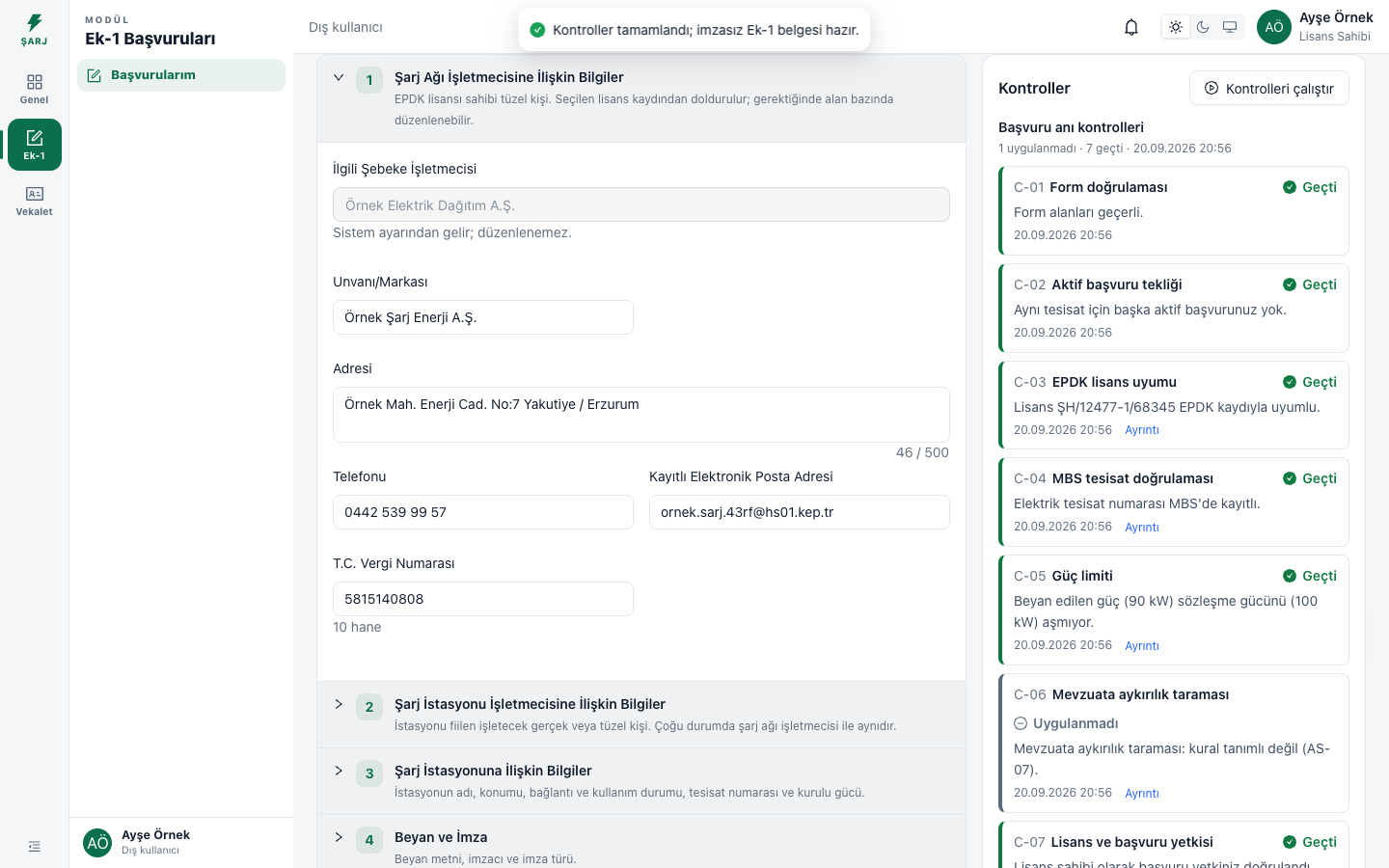
Faulty applications are caught before they reach the DSO: eight automatic checks run before submission — form validation, a block on a second active application for the same installation, EPDK licence consistency, installation verification against the customer information system (MBS), a power limit based on contracted capacity, a regulatory non-compliance scan, application authority and regional coordinatorship mapping. If any check is blocking, the Annex-1 document for signing is not generated. A submitted application is routed automatically to the right regional coordinatorship and the 5-business-day clock starts; it runs on a business calendar that excludes weekends, public holidays and holiday-eve afternoons, and alerts the right people at every threshold.
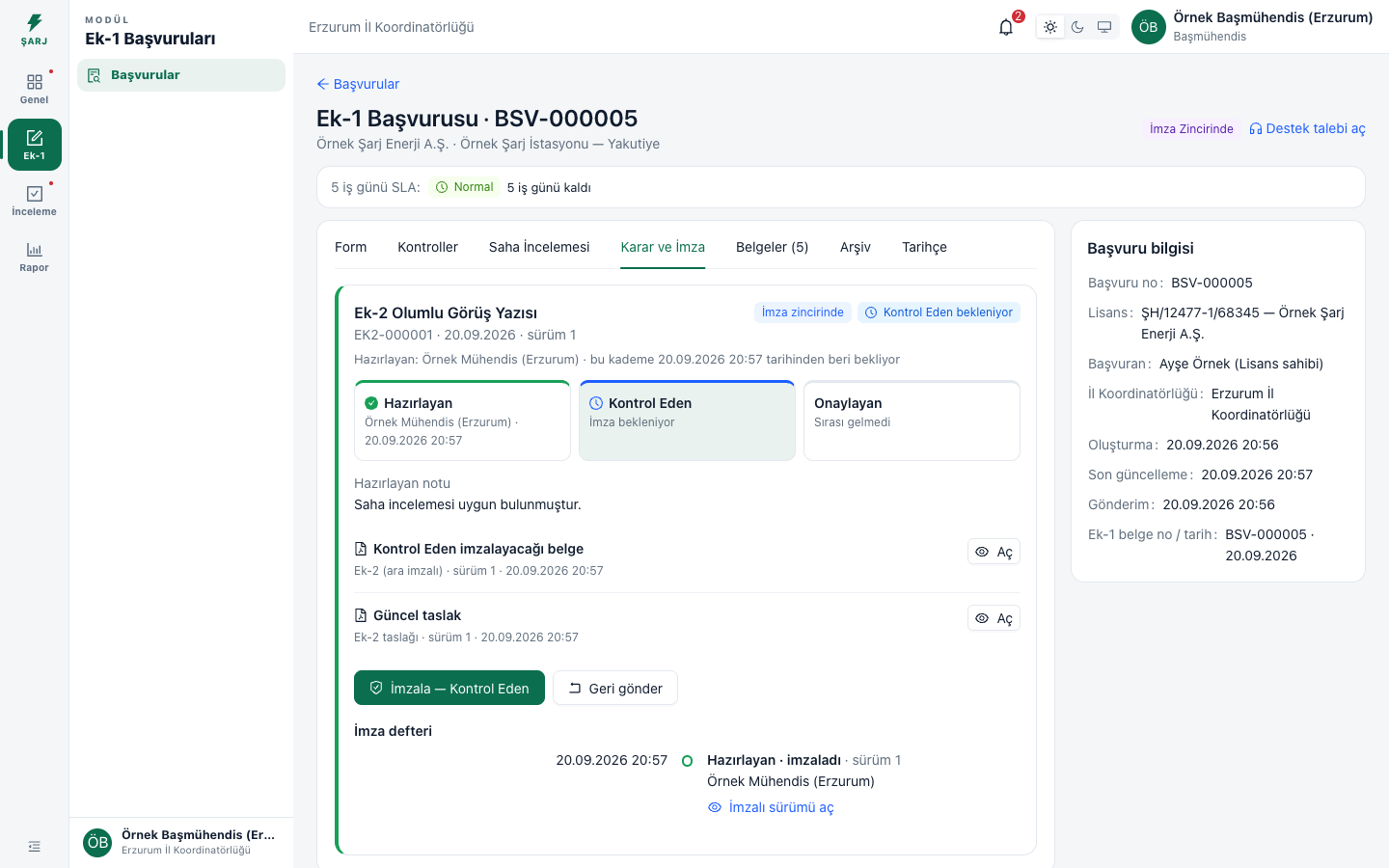
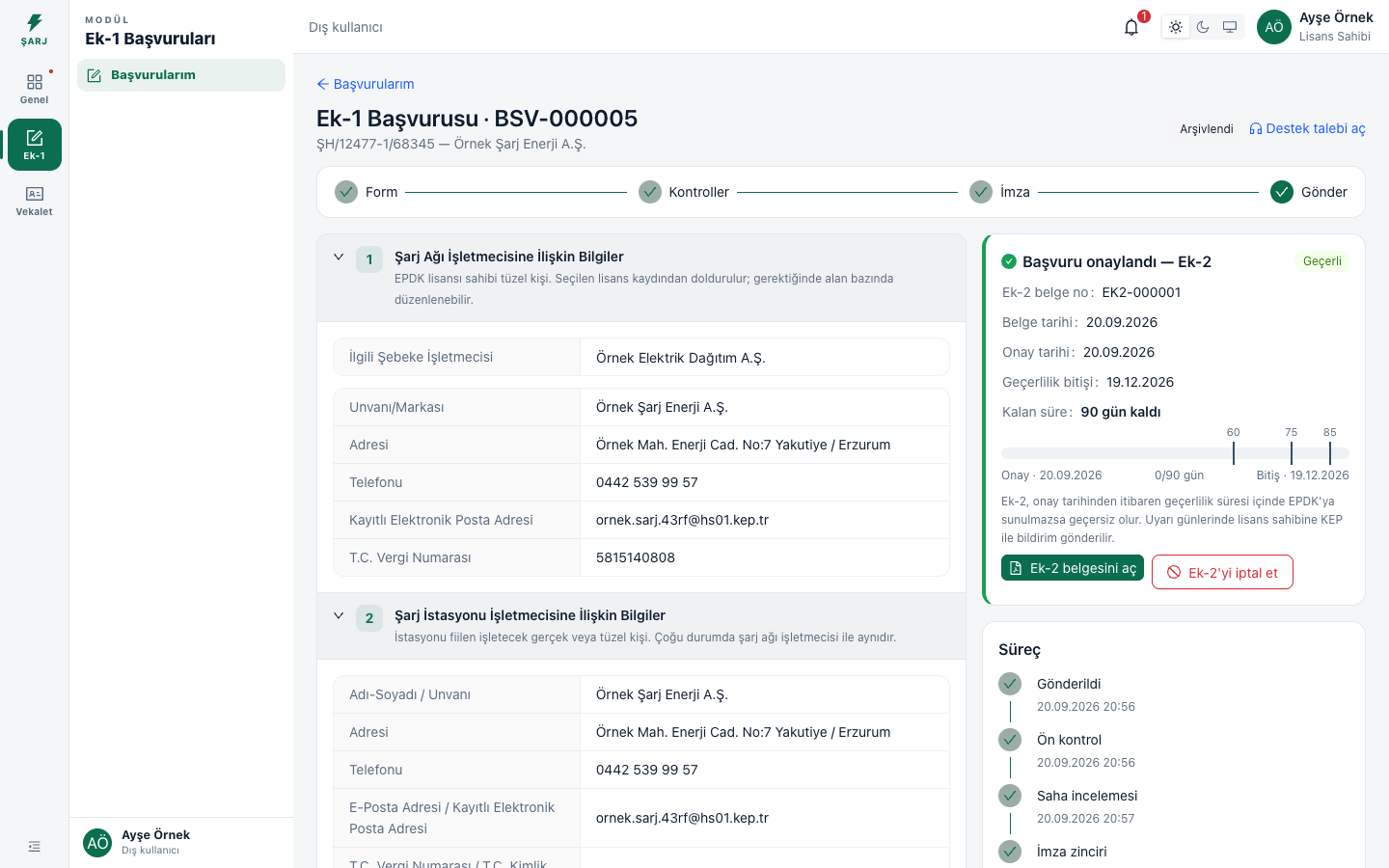
Site inspection is done from the phone view of the same application with a checklist. The Annex-2 letter is signed in three tiers — preparer, reviewer and approver — and the same person cannot sign two tiers. The 90-day validity of an issued Annex-2 is tracked, with registered e-mail (KEP) warnings sent to the licence holder on days 60, 75 and 85. All durations and thresholds are parameters managed from the admin panel rather than hard-coded values, so a regulatory change needs no software change. The platform runs entirely on the institution's own servers (on-premises) and uses no cloud storage.
Key Features
The licence holder picks their own licence from the EPDK list in a five-step wizard; a claimed licence cannot be picked again and the verification code goes to the address registered with the licence. A proxy uploads a power of attorney for one or more licences; the licence holder is notified by KEP and the request is rejected automatically if no decision is made within 7 days.
EPDK licence · NES · power of attorneyThe official Annex-1 template is followed exactly: network operator, station operator, station, declaration and signature. Data is filled from the licence record, the form is saved as a draft, and coordinates, installation number and installed power are validated as they are typed. The selected province routes the application to the right regional coordinatorship.
4 sections · auto-fill · WGS84Form validation, active-application uniqueness, EPDK licence consistency, MBS installation verification, power limit, regulatory non-compliance scan, application authority and coordinatorship mapping are each recorded with their reasoning. If any result is blocking, no Annex-1 is generated for signing; if an external system does not respond, the result is "could not be checked" and the query is retried.
C-01 … C-08 · MBS · EPDKOnce the checks pass, a one-page official Annex-1 PDF is generated; the signed document is uploaded and virus-scanned. The signature is bound to the document hash: if the form changes and the PDF is regenerated, the old signature becomes invalid.
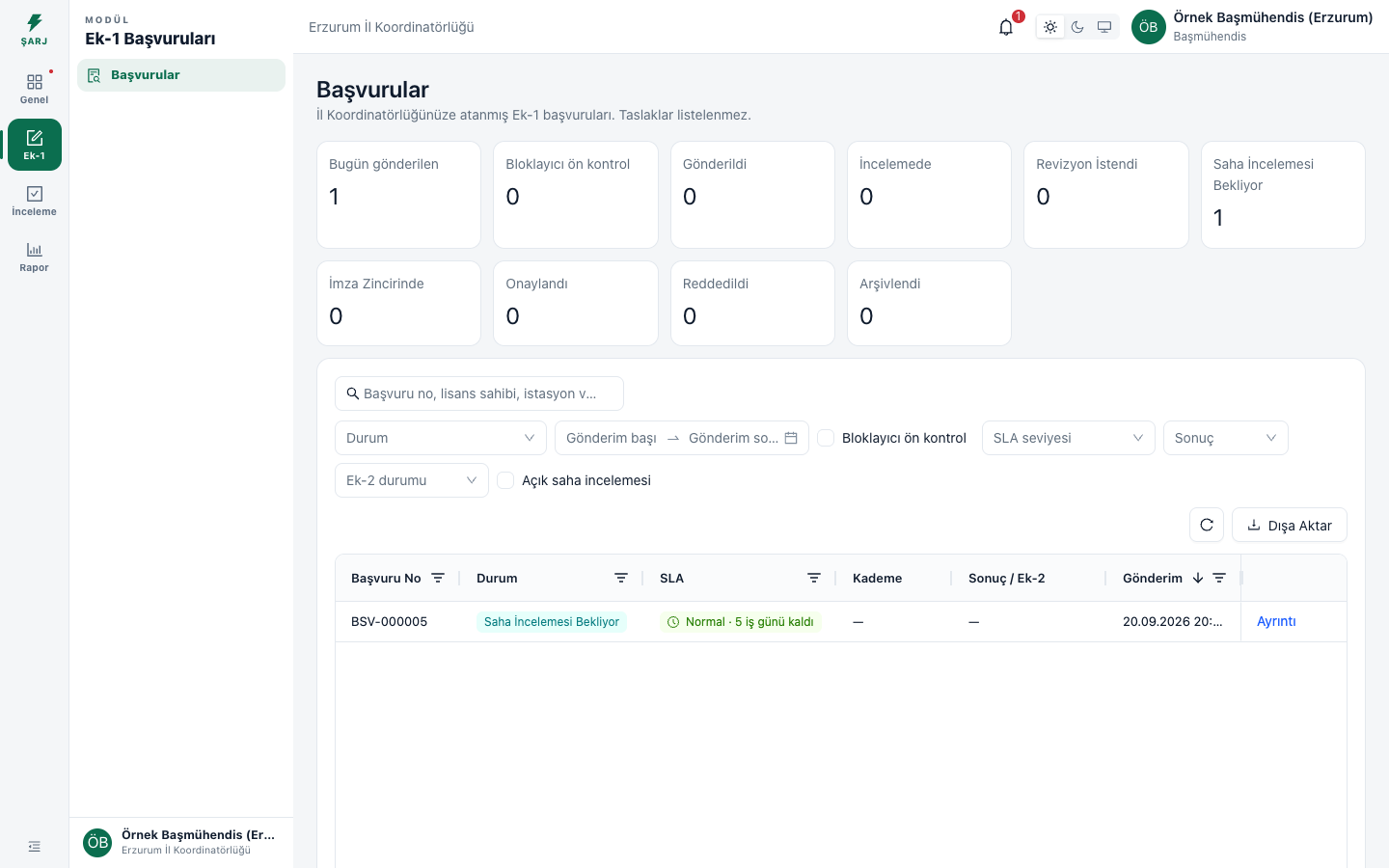
PDF · virus scan · document hashThe application is routed to its regional coordinatorship automatically, and staff see only their own province. Status counters, a filterable and shareable list and xlsx/csv export are built in. A revision can be requested for missing documents during pre-check, and the chief engineer assigns field staff.
auto-routing · filters · xlsx/csvFive business days run as 120 hours of working time, excluding weekends, public holidays and holiday-eve afternoons. As time passes the level moves from "Normal" to "Overdue"; each threshold is announced once and the recipient group widens. The clock stops when a revision is requested and resets on resubmission.
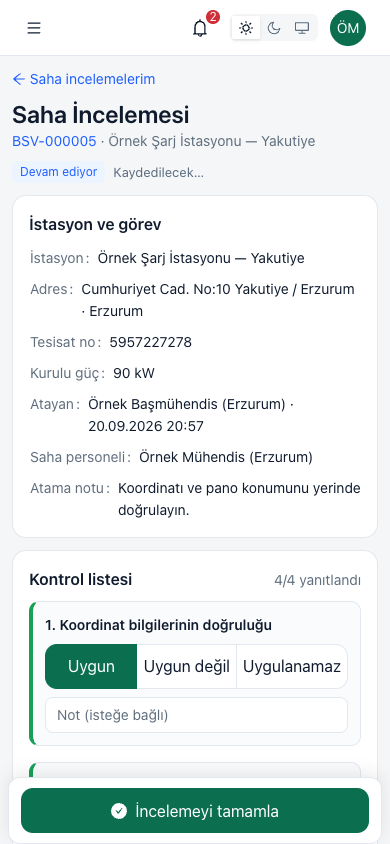
5 business days · holiday calendar · escalationField staff open the task on their phone and fill in the checklist as "Compliant / Non-compliant / Not applicable"; the draft is saved automatically and the result is written to the application history. The interface is responsive, so no separate mobile app is needed.
checklist · phone · draft saveThe preparer (engineer), reviewer (chief engineer) and approver (manager) sign in turn, each signing the signed output of the tier before. The same person cannot sign two tiers. Sending back opens a new version, while earlier signatures remain in the immutable signature ledger.
PAdES · timestamp · segregation of dutiesOn approval the Annex-2 letter reaches the applicant; the result card shows the document number, expiry date and a remaining-days bar. KEP warnings go out on days 60, 75 and 85; if the station does not appear on EPDK's active list the expiry is flagged, and if the list is stale an alarm is raised instead of a wrongful cancellation.
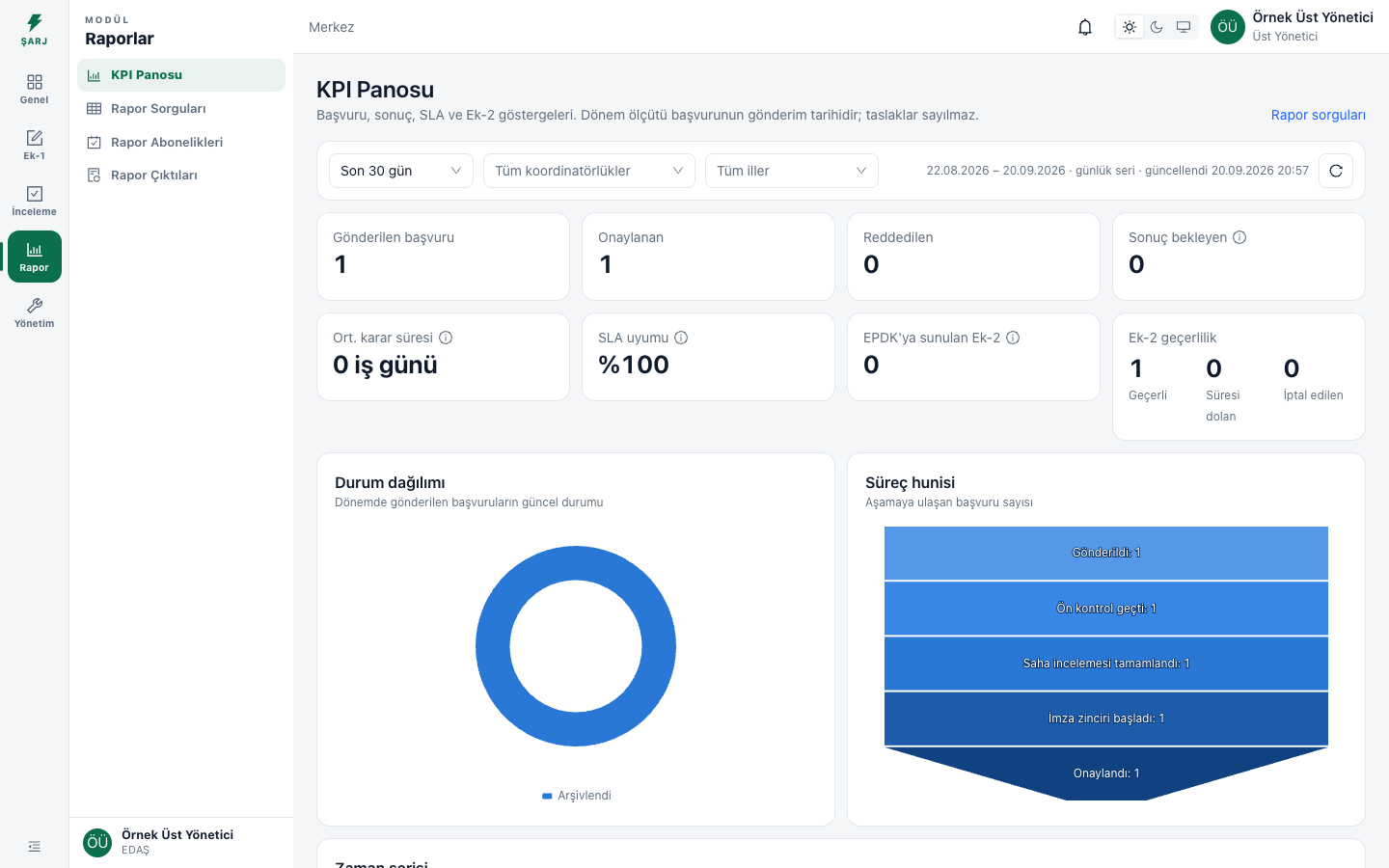
90 days · day 60/75/85 · EPDK matchEvery status transition produces an event; which event goes through which channel is governed by rules, and templates are edited from the panel. The KPI dashboard shows applications, outcomes, SLA compliance and Annex-2 validity, and report subscriptions e-mail a link rather than an attachment.
e-mail · in-app · SMS · KEPThe 5-day limit, SLA thresholds, the 7-day proxy window, 90-day validity and warning days are all changed from the panel. Roles and permissions, signature tiers, the holiday calendar, notification templates and privacy notices are managed here too; an empty or broken setting is never swallowed silently but shown as a warning.
durations · roles · holiday calendarAudit, signature and status-transition ledgers are append-only. The archive is kept with a manifest and SHA-256 hashes, and signed documents never change. Personal data is masked on screen and in logs, access is recorded, and retention and disposal processes are defined.
append-only · SHA-256 · maskingAdditional Modules
How It Works
- 01Apply — account, proxy and Annex-1
The licence holder or an approved proxy fills in the Annex-1 form; data comes from the licence record and fields are validated as they are typed.
- 02Check — eight automatic checks and signature
Eight checks, including MBS and EPDK, are run; the Annex-1 PDF of a passing application is signed and uploaded, and submission starts the 5-business-day clock.
- 03Review — coordinatorship and site
The application lands at the regional coordinatorship and passes pre-check; staff assigned by the chief engineer inspect the site from their phone with a checklist.
- 04Sign — three-tier decision
The Annex-2 letter of approval or the rejection letter is e-signed in turn by the preparer, reviewer and approver.
- 05Issue — Annex-2, 90 days and archive
The Annex-2 reaches the applicant, its 90-day validity is tracked with KEP warnings, and the process closes in an immutable archive.
Who It's For
Conclude EV charging station applications within regulatory deadlines, paperless and audit-ready, while spreading the workload across regional coordinatorships automatically.
Run pre-checks, site inspections and Annex-2 preparation from a single screen, working with pre-validated applications instead of chasing missing information.
Apply online, see gaps before you submit, follow status and remaining time in real time, and get warned before your Annex-2 expires.
Technical Summary
- Scope
- The entire process under the EPDK EV charging service regulation, from the Annex-1 application to the Annex-2 approval / rejection letter and archive
- Users and roles
- Applicants: licence holder, proxy. DSO: engineer, chief engineer, manager, system administrator. Internal users are scoped to their regional coordinatorship
- Authentication
- Sign-in by e-mail and password or qualified e-signature (NES), 6-digit verification code, secure session cookie, account lockout and bot protection
- Integration
- MBS (installation number, contracted capacity), EPDK (licences and active station list), KEP, e-signature — each through its own integration gateway
- E-signature
- PAdES signatures with timestamps; three tiers, segregation of duties, immutable signature ledger
- Durations (configurable)
- 5-business-day SLA and thresholds, 7-day proxy decision, 90-day Annex-2 validity, day 60/75/85 warnings, holiday calendar
- Notification channels
- E-mail, in-app, SMS and KEP; templates managed from the admin panel
- Reporting and export
- KPI dashboard, report queries and subscriptions; Excel (.xlsx) and CSV
- Records and archive
- Append-only audit, signature and status ledgers; archive with manifest and SHA-256 hashes
- Data protection (KVKK)
- Masking on screen and in logs, access logging, retention and disposal processes
- Interface
- Responsive web interface (desktop, tablet, phone), light and dark themes, WCAG AA contrast, current browsers
- Deployment
- Fully on-premises on the institution's servers; no cloud storage
App Screenshots
Frequently Asked Questions
What is Şarj Başvuru ve Onay Platformu?
An application platform for electricity distribution companies, built on the EPDK EV charging service regulation: one paperless, time-bound and traceable flow from the Annex-1 application to the Annex-2 letter of approval — automatic pre-submission checks, 5-business-day SLA tracking, mobile site inspection and a three-tier e-signature chain.
Who is Şarj Başvuru ve Onay Platformu for?
Electricity distribution companies (DSOs): Conclude EV charging station applications within regulatory deadlines, paperless and audit-ready, while spreading the workload across regional coordinatorships automatically. Engineering and field teams: Run pre-checks, site inspections and Annex-2 preparation from a single screen, working with pre-validated applications instead of chasing missing information. Charging network operators: Apply online, see gaps before you submit, follow status and remaining time in real time, and get warned before your Annex-2 expires.
How does Şarj Başvuru ve Onay Platformu work?
1. Apply — account, proxy and Annex-1 — The licence holder or an approved proxy fills in the Annex-1 form; data comes from the licence record and fields are validated as they are typed. 2. Check — eight automatic checks and signature — Eight checks, including MBS and EPDK, are run; the Annex-1 PDF of a passing application is signed and uploaded, and submission starts the 5-business-day clock. 3. Review — coordinatorship and site — The application lands at the regional coordinatorship and passes pre-check; staff assigned by the chief engineer inspect the site from their phone with a checklist. 4. Sign — three-tier decision — The Annex-2 letter of approval or the rejection letter is e-signed in turn by the preparer, reviewer and approver. 5. Issue — Annex-2, 90 days and archive — The Annex-2 reaches the applicant, its 90-day validity is tracked with KEP warnings, and the process closes in an immutable archive.
Which systems and standards does Şarj Başvuru ve Onay Platformu work with?
Integration: MBS (installation number, contracted capacity), EPDK (licences and active station list), KEP, e-signature — each through its own integration gateway. Deployment: Fully on-premises on the institution's servers; no cloud storage.
Benefits
- A paperless, traceable application process
- Faulty applications are caught before submission
- The 5-business-day deadline is never missed
- Regulatory changes need no software change
A platform that digitalizes asset, investment and maintenance management end-to-end for electricity distribution and energy companies, with geographic information system (GIS) support.
Meter reading via OCR and optical port, connect/disconnect, AI-assisted job dispatch, route optimization, material tracking and SAP integration — the whole field operation in one application.
Projects delivered with this product

Other Products

GEONIVA — Drone and AI Grid Inspection
Generates drone missions from work orders, scans drone and field photos with AI, links each finding to the right grid equipment and writes approved findings into the maintenance form. Known in GeoEner as Inspection Management, it is the inspection module of the GEOENER family.
Explore ProductGeoEner PQM — Power Quality Management Software
Continuously monitors voltage sags, harmonics, flicker and unbalance; automatically audits against EN 50160 and regulatory power quality criteria, and produces audit-ready reports.
Explore ProductGeoEner PSM — Power System Management
Monitor your distribution grid in real time; manage alarms, loading and regulatory risk from a single operator console. The operations module of the GEOENER platform.
Explore ProductLet's start your digital transformation together
Reach out today to discuss your project with our expert team.