SOtech Mail
A business e-mail, calendar and contacts platform hosted on servers in Türkiye: your mailboxes and data are kept on servers in Istanbul, or installed on your organization's own servers. Web, iOS and Android apps; mandatory two-factor authentication, multiple domains and Outlook-compatible meeting invitations.

About the Product
SOtech Mail is a business communication solution that covers an organization's e-mail, calendar and contacts on one platform. Mailboxes and data are hosted on servers in Istanbul, Türkiye; for organizations that want to keep their data entirely on their own infrastructure, the platform is installed on their own servers. A single installation serves multiple domains; the required DNS records are generated automatically for each domain, and signing keys are rotated regularly.
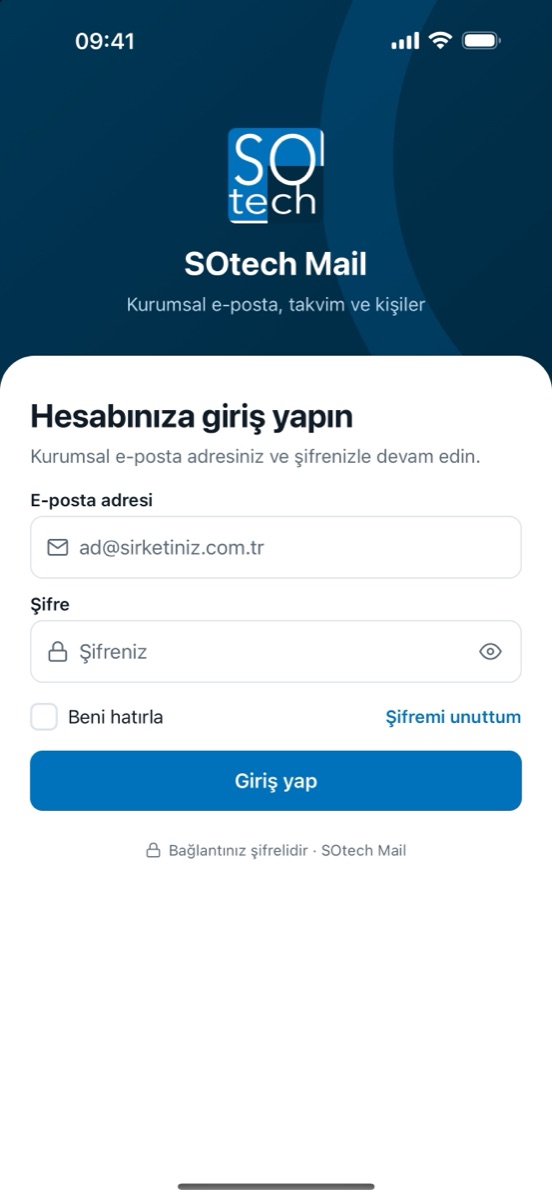
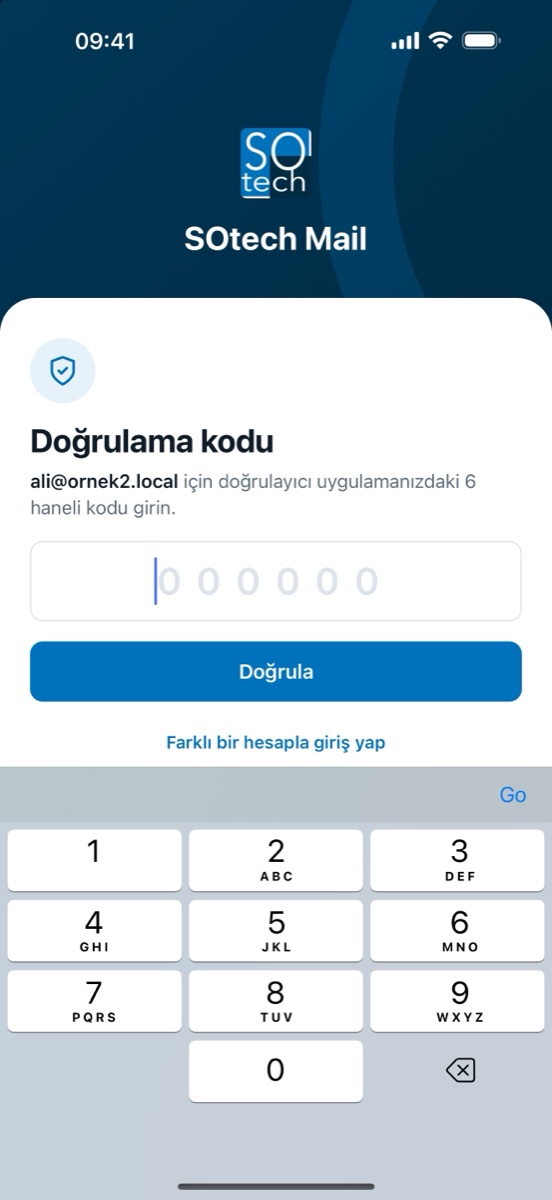
Users sign in from a web browser or the iOS and Android apps; sign-in is protected by two-factor authentication, and repeated failed attempts trigger a human verification step that does not rely on any third-party service. Mail includes nested folders, multi-condition rules, labels, snooze, automatic replies, sender blocking, advanced search and automatic draft saving; new mail and changes made on other devices appear instantly without reloading.
The calendar sends Outlook-compatible meeting invitations, invitees can accept, tentatively accept or decline, and participants receive reminders. Contacts, distribution lists and shared mailboxes that teams follow together live in the same app. Outlook, Thunderbird and phones' built-in mail apps connect with app passwords, and a one-tap setup profile is generated for iPhone. Mailboxes at the current provider are migrated in bulk over IMAP. Teams using HİBRİTİK can create a project task directly from a message.
Key Features
Mailboxes, calendars, contacts and attachments are hosted on servers in Istanbul, Türkiye. For organizations that want to keep their data entirely on their own infrastructure, the platform is installed on their own servers, with scripts for installation, updates and backups.
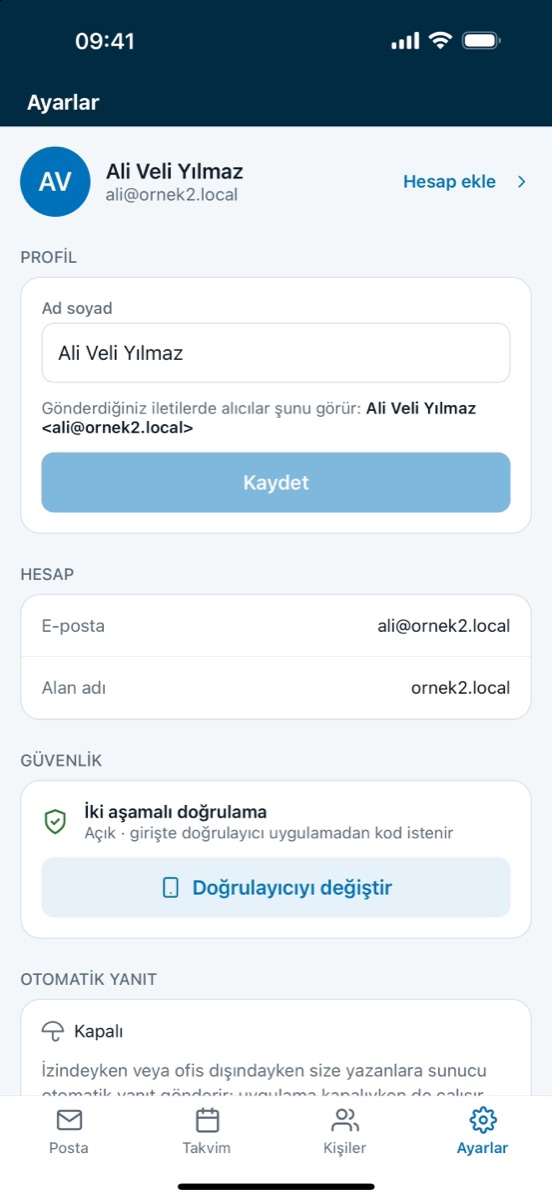
Istanbul · on-premisesTwo-factor authentication is mandatory by default; the app cannot be used until it is set up. Repeated failed attempts trigger a human verification step that does not rely on any third-party service. Mail clients and sending systems use app passwords with send-only or mail-client permissions instead of the main password, and the password is never stored on the device.
2FA · app passwords · human checkA single installation serves multiple domains. SPF, DKIM, DMARC, MTA-STS, TLS-RPT and autoconfiguration records are generated for each domain, and DKIM signing keys rotate automatically every 90 days. DMARC reports are delivered to the organization's own address.
SPF · DKIM · DMARC · MTA-STSIncoming mail is filtered with global blocklists, an automatically updated rule set, SPF/DKIM/DMARC checks and a classifier that learns from users' markings. Hourly and daily sending limits and a per-message recipient limit stop bulk spam even if an account is compromised.
blocklists · learning filter · send limitsNested, color-coded folders, multi-condition and multi-action rules, labels, pinning and snooze. Rules, automatic replies and sender blocking run on the server, so they apply even when the app is closed. Rules can be exported, imported and applied to existing messages.
folders · rules · labels · snoozeThe same app on web, iOS and Android: folder menu, message list and reading pane on desktop; swipe-to-delete and bulk selection on phones. New mail and changes on other devices appear instantly, with phone and desktop notifications for new mail. Multiple accounts open in the same app.
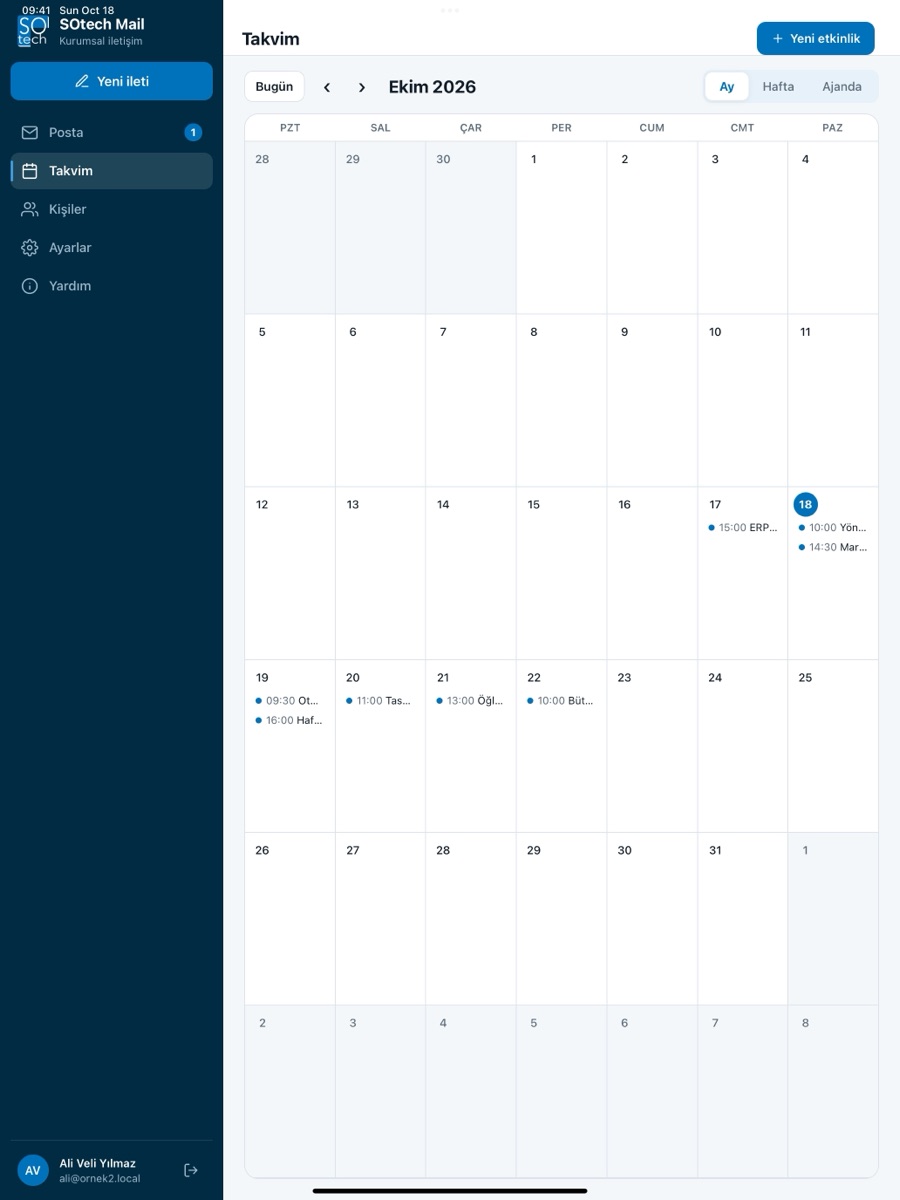
instant · notificationsMonth, week and agenda views, recurring events and meetings with participants. Invitations are compatible with Outlook; accept, tentative and decline replies and cancellations are processed, and reminder e-mails go to participants before meetings. Contacts are searchable, and addresses in a message can be added as contacts.
Outlook-compatible invites · remindersMail sent to a distribution list is copied to each member's own inbox, while mail sent to a shared mailbox lands in a single box the team follows together. The shared mailbox opens from the account menu, and replies go out from the member's own address.
distribution list · shared mailboxMailboxes at the current provider are migrated in bulk over IMAP. Outlook, Thunderbird and phones' built-in mail apps connect over IMAP, SMTP, CalDAV and CardDAV; in-app guides show user-specific server settings, and a one-tap setup profile is generated for iPhone.
IMAP · Outlook · Thunderbird · iPhoneTeams using HİBRİTİK create a task directly from a message by choosing the project, assignee, priority, date and labels; the message's attachments are uploaded to the task automatically. The connection is set up with a personal connection code entered in Settings; the code is stored encrypted on the server.
message to taskAdditional Modules
How It Works
- 01Add your domain
The domain is added; SPF, DKIM, DMARC and autoconfiguration records are generated and published to DNS.
- 02Create or migrate accounts
Accounts are created in bulk; mail at the current provider is migrated over IMAP.
- 03Secure sign-in
Users sign in from the web or mobile app and set up two-factor authentication on first sign-in.
- 04Connect teams
Distribution lists, shared mailboxes and calendars are set up; mail clients connect with app passwords.
Who It's For
Host your mailboxes on servers in Istanbul or on your own servers, and run your data protection processes on your own infrastructure.
Manage multiple domains on one platform, each with its own DNS records and accounts.
Reach mail, calendar and contacts from the phone, and manage meeting invitations and shared mailboxes in the same app.
Pricing
- Prices are for annual upfront payment; monthly payment is charged 20% more.
- Migration from your current provider is free with an annual contract.
- Additional storage: 20 TL per 10 GB per month.
- Prices apply to the service hosted on our servers in Istanbul; installation on your own servers is quoted separately.
Technical Summary
- Hosting
- Servers in Istanbul, Türkiye, or the organization's own servers (on-premises)
- Protocols
- SMTP, IMAP, JMAP, CalDAV, CardDAV
- E-mail security
- SPF, DKIM (automatic key rotation every 90 days), DMARC, MTA-STS, TLS-RPT
- Authentication
- Mandatory two-factor authentication (authenticator app), app passwords, human verification after failed attempts
- Platforms
- Web, iOS and Android apps; light and dark theme
- Compatible clients
- Outlook, Thunderbird, iPhone/iPad and Android mail apps; iPhone setup profile
- Data import
- Bulk mail migration from the current provider over IMAP
- Attachments
- Up to 50 MB of attachments per message; recipient warning above 25 MB
- Abuse protection
- Multi-layer spam filtering for incoming mail; hourly/daily and per-message recipient limits for senders
- Integration
- Create HİBRİTİK tasks from messages; send-only app passwords for systems
App Screenshots
Frequently Asked Questions
How much does SOtech Mail cost?
Per user per month, excluding VAT: 5 GB 60 TL, 10 GB 100 TL, 25 GB 150 TL, 50 GB 199 TL. Prices are for annual upfront payment; monthly payment is charged 20% more. Migration is free with an annual contract, and additional storage is 20 TL per 10 GB per month. Installation on your own servers is quoted separately.
How does SOtech Mail work with HİBRİTİK?
Teams using HİBRİTİK create a HİBRİTİK task directly from an e-mail: they choose the project, assignee, priority, date and labels, and the message's attachments are uploaded to the task automatically. The connection is set up with a personal connection code entered in SOtech Mail Settings, and the code is stored encrypted on the server.
Where is our e-mail hosted with SOtech Mail?
Mailboxes, calendars, contacts and attachments are hosted on servers in Istanbul, Türkiye. For organizations that want to keep their data entirely on their own infrastructure, SOtech Mail can also be installed on their own servers, with scripts for installation, updates and backups.
Can we migrate our existing e-mail to SOtech Mail?
Yes. Mailboxes at the current provider are migrated in bulk over IMAP, and accounts are created in bulk. When the domain is added, SPF, DKIM, DMARC and autoconfiguration records are generated automatically.
Does SOtech Mail work with Outlook and phone mail apps?
Yes. Alongside SOtech Mail's own web, iOS and Android apps, Outlook, Thunderbird and phones' mail apps connect over IMAP, SMTP, CalDAV and CardDAV. Because two-factor authentication is on, these programs use app passwords instead of the main password, and a one-tap setup profile is generated for iPhone. Meeting invitations are compatible with Outlook.
What is SOtech Mail?
A business e-mail, calendar and contacts platform hosted on servers in Türkiye: your mailboxes and data are kept on servers in Istanbul, or installed on your organization's own servers. Web, iOS and Android apps; mandatory two-factor authentication, multiple domains and Outlook-compatible meeting invitations.
Who is SOtech Mail for?
Organizations that keep data in Türkiye: Host your mailboxes on servers in Istanbul or on your own servers, and run your data protection processes on your own infrastructure. Groups and multi-brand organizations: Manage multiple domains on one platform, each with its own DNS records and accounts. Mobile and field teams: Reach mail, calendar and contacts from the phone, and manage meeting invitations and shared mailboxes in the same app.
How does SOtech Mail work?
1. Add your domain — The domain is added; SPF, DKIM, DMARC and autoconfiguration records are generated and published to DNS. 2. Create or migrate accounts — Accounts are created in bulk; mail at the current provider is migrated over IMAP. 3. Secure sign-in — Users sign in from the web or mobile app and set up two-factor authentication on first sign-in. 4. Connect teams — Distribution lists, shared mailboxes and calendars are set up; mail clients connect with app passwords.
Which systems and standards does SOtech Mail work with?
Data import: Bulk mail migration from the current provider over IMAP. Integration: Create HİBRİTİK tasks from messages; send-only app passwords for systems.
Benefits
- Your data on servers in Istanbul, Türkiye
- Mail, calendar and contacts on one platform
- Two-factor authentication by default
- Works with Outlook and phone mail apps
Request a quote
We prepare a quote tailored to your organization based on:
- Installation on your own servers
- Number of users (mailboxes) and quota mix
- Migration plan from your current provider
Led by Gantt-based project management, with corporate communication, 360° performance and quality management — 4 core modules on one platform.
Other Products

GeoEner — Investment & Maintenance Management System
A platform that digitalizes asset, investment and maintenance management end-to-end for electricity distribution and energy companies, with geographic information system (GIS) support.
Explore Product
GEONIVA — Drone and AI Grid Inspection
Generates drone missions from work orders, scans drone and field photos with AI, links each finding to the right grid equipment and writes approved findings into the maintenance form. Known in GeoEner as Inspection Management, it is the inspection module of the GEOENER family.
Explore ProductGeoEner PQM — Power Quality Management Software
Continuously monitors voltage sags, harmonics, flicker and unbalance; automatically audits against EN 50160 and regulatory power quality criteria, and produces audit-ready reports.
Explore ProductLet's start your digital transformation together
Reach out today to discuss your project with our expert team.